Connecting SKAI to your WMS, TMS or ERP
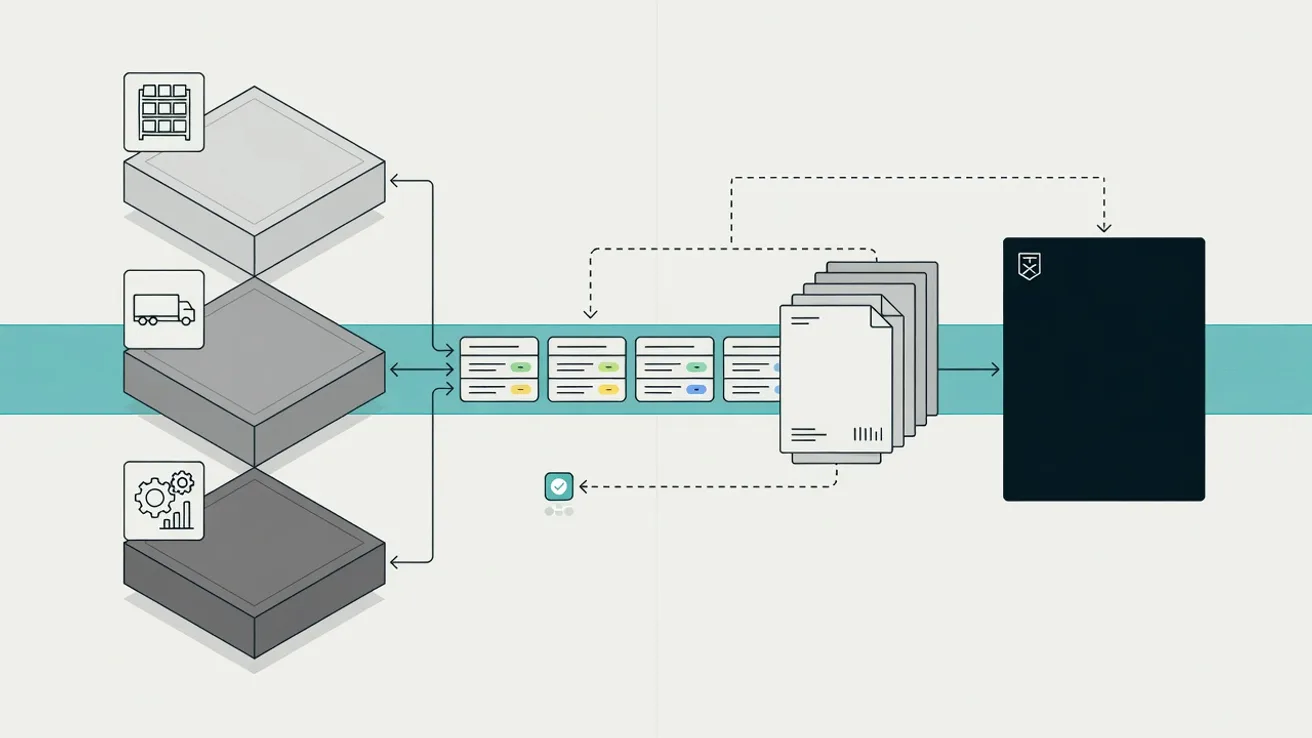
A connection to your WMS, TMS or ERP does not mean swapping out a system. SKAI sits on top of what you already run, pulls the shipment data that is already there through a REST API, and writes the declaration status and the MRN back into the system your planners and your billing team work in every day.
Does SKAI replace my WMS, TMS or ERP?
No. Your warehouse system stays the place where stock lives, your TMS stays the place where trips and containers live, and your ERP stays the place the order and the invoice come from. SKAI puts a customs layer on top of that and talks to those systems over a REST API. That is a deliberate choice. Changing a customs process is disruptive enough on its own. Add a migration of your warehouse or order system and go live slips by half a year, with your team sitting in two projects at once. On top of that, the system you already run is usually not the problem. The problem is that the customs step sits next to it, in Excel, in email and in separate portals. In practice nothing changes on the screens your people already use. Your planner books the shipment the way they always did, and the declaration comes out of that. What you do see back is a status field and an MRN on the file, so nobody has to open a second system to find out whether a shipment has been released.
Which data goes to SKAI and what comes back?
Going out are the shipment and the article. From your TMS or WMS come the shipment number, the client, the loading and unloading place, the container number, the number of packages, the gross and net weight and the procedure you want to use. From your ERP or article file come, per line, the goods code, the country of origin, the value, the currency, the quantity in the right unit and the document codes that belong to that article. Coming back is what customs makes of it. As soon as SKAI has built the file and filed it, the connection writes the status back: in progress, accepted, rejected with the reason attached, or released. On acceptance the MRN comes with it, and that number is exactly what your driver, your terminal and your client want to see. That return leg is more than reassurance for planning. The MRN and the file status are also the hooks your invoicing hangs on. Only once there is a declaration number does your back office know what can be billed and against which file.
Why does master data decide whether a connection works?
A connection moves data, it does not invent it. A goods code that is not in your article file is still nowhere after the connection is built. The same goes for the country of origin and for the document code of a licence or a certificate. In practice those three fields are why a declaration stalls. SKAI catches part of that by reading the source document. If the code is on the invoice, SKAI takes it from there, with a source label pointing back to the line it came from. Value, weight and quantities are compared across invoice, packing list and B/L, so a discrepancy surfaces before the declaration goes out. But what is written nowhere has to be typed by a person, and that is precisely the work you wanted the connection to save. That is why an implementation starts with the article file and not with the technology. How many articles carry an eight or ten digit code, how many carry an origin, and how many carry only a description? That answer decides how much of your flow runs through untouched and which client you start with.
What does the yearly Combined Nomenclature change do to your article file?
The Combined Nomenclature changes every year on 1 January. Codes lapse, split or get a different wording, and that happens even when nothing about your product has changed. The new version appears in the Official Journal in the autumn, with correlation tables showing which old code maps to which new one. In an article file that is not maintained, the picture is the same every year. In the first week of January a run of declarations comes back because the code no longer exists, and your team is hunting for codes while the containers are already on the quay. A connection makes that more visible rather than smaller, because declarations go out faster and the rejections therefore come back faster too. The remedy is dull and it works. Record per article when the code was last checked and what the classification rests on: the heading text, a note or a BTI. Run the file past the correlation tables in November. SKAI checks every code against DTV and EU TARIC, including the measures and the required documents, so a lapsed code surfaces before the declaration is filed rather than after.
How do you keep customs warehouse stock tied to the declarations?
For a customs warehouse the connection is not a convenience but a condition of the authorisation. The stock records have to tie to the declarations at all times. Every placement belongs to a declaration, every removal belongs to a declaration, and a difference you cannot explain becomes a customs debt on the missing goods. In practice it goes wrong where the warehouse and the customs records move independently. A correction in the WMS, a pallet booked to another location, a damage line or a sample taken out: if that movement never reaches the customs side, the difference is there and grows quietly until the first audit. A connection that carries the stock movements keeps both sides in the same motion. What the warehouse books arrives in the customs records, and what SKAI declares comes back onto the stock line. A monthly manual reconciliation rarely meets the requirement, simply because a difference that is four weeks old can no longer be reconstructed.
How long does a connection take and what do you need from our side?
Count on weeks, not months. A connection is not a migration: no data is moved and no system is switched off. The work sits in agreeing the fields, testing on real files and cleaning up the master data where it rubs. In the wider project it runs alongside the rest: connect, configure, two weeks running along with one or two clients, then internal training with your declarants on your own files. To start, SKAI needs three things from your side. Access to a test or acceptance environment of the system we connect to, with the documentation or field list that goes with it. An export of your article file, even an incomplete one, because the gaps are information in themselves. And someone who knows the system, on your side or at your supplier, who can say which field a value actually sits in. What helps beyond that is a set of twenty to fifty real files from a client you know well. Testing on those is faster than on invented test data, and it shows straight away which rules run differently for that client by definition.